Iterative Design Meaning: User Feedback in Design Iterations
At its core, iterative design meaning is about developing a product that resonates with users. Overall, in the words of Garry Tan, former YCombinator partner:
“So what is design? Why does it matter? In a nutshell, … it’s just creating things for users that work well and delight them.“
At the same time, creating easy-to-use and intuitive apps for the myriad of devices, screens, and browsers can present a challenge. Multiply that by the complexity of today’s apps and changes in user cognitive flexibility (attention span, tolerance for ambiguity, learnability, etc), and the design challenge becomes apparent. As a result, the job of delighting users takes a step-by-step approach rather than one-and-done.
Design is also the area of development that produces the highest ROI. As a general rule, the average ROI is $100 in revenues for every dollar invested. For companies at scale, this can often be much higher. For instance, Duolingo researched the user experience of its Streak functionality. They found out that users who break the streak would become quite upset. That led to abandoning the app completely or a sharp decrease in usage. They added a Streak Freeze, which resulted in a relative retention increase by 20%. For a company with 50 million daily active users, 20% increase in retention means more free users watch ads, and premium users stay longer. This surely adds millions in revenues. Moreover, users actually have to purchase these streaks with in-app currency – gems.
In this blog post, we’ll dive into the iterative design meaning and connect design iterations with user feedback.
Design Iterations and User Feedback in Minimum Viable Product (MVP)
Contrary to widespread misconceptions, lean MVP development is inherently user-centric. Many mistake a lean MVP for an excuse for poor design, unfinished interfaces, and a product devoid of empathy for the user. In reality, though, this methodology, especially its lean version, tries to include users as early as possible and make them co-creators of the product that solves their pain points. Each iteration aims to increase product value, specifically user value, not the number of features that engineers can implement the fastest. Basically, it does not matter what engineers or product managers see as viable; MVP is what users find viable.

In lean MVP, UI/UX design development encompasses a range of activities:
- gathering user feedback and analytical data,
- interpreting it and connecting to existing knowledge,
- drafting potential solutions,
- scrutinizing them,
- prototyping,
- choosing the one that is the most likely to solve user problems and hit the company’s business goals.
So, when it comes to mobile UI design and UX, the design “iceberg” is only partially visible, and entails a lot of ‘behind-the-scenes’ elements. This is why doing it in iterations / small steps is much more efficient, in terms of cost, risk, and result.
Duolingo: iterative design meaning example
As an example of Duolingo, a design iteration could have been triggered by data first. It was likely to have been an observation that previously engaged users showed a cliff behavior, sizably reducing the usage or churning completely. Then, the analytics team would have dug deeper through cohort analysis to find drop-off points. After that, user interviews should have followed to understand the ‘why’ and hear the user’s voice. In the interpretation stage, it would have been connected to the psychology, along with possible solutions. Having done that, the team must have come up with more than one idea.
As such, they implemented and deployed Streak Freeze and moved on to the next iteration. They added a variable ‘gem’ price for purchasing the streaks. Then, they also added a ‘streak repair’ for a limited time period as a non-purchase option. It is also fair to assume that they had iterations and talked to users to figure out the right time period for a streak repair, as well as the price for streak freezes.
Design Iterations: The Role of User Feedback
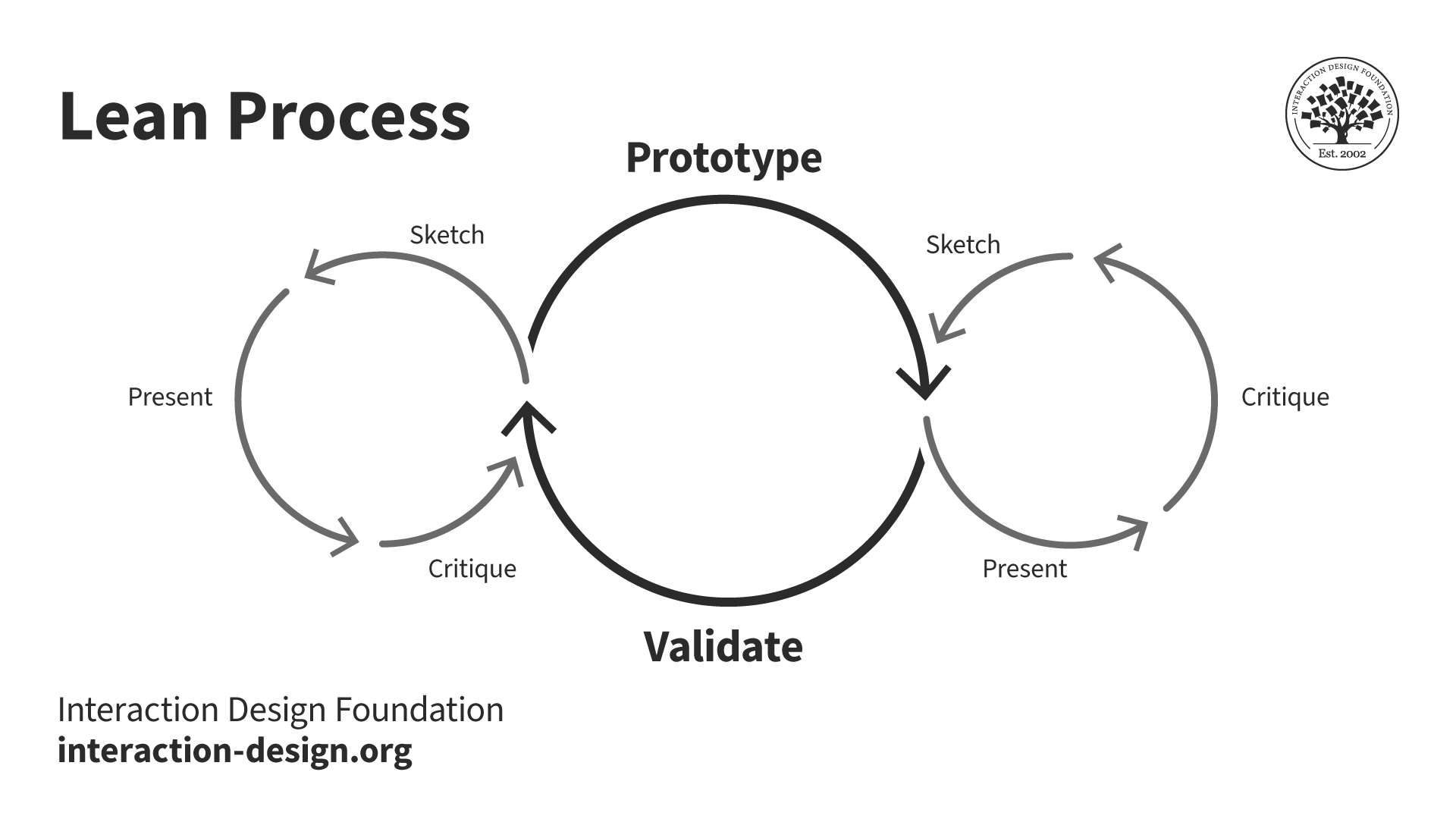
The user’s perspective is at the heart of iterative design meaning. In the image below, you can see that the central loop of design iterations consists of prototype and validate actions. Validation is exactly about testing the design with real users. However, smaller loops also present a potential for getting and incorporating real user feedback. These all constitute a conceptual image of iterative design meaning.

When it comes to the actual flow of activities within each iteration, views differ. Design literature often puts what the user needs/wants as a starting point. Then it is followed by the stages of analysis, design, prototyping, and implementation.

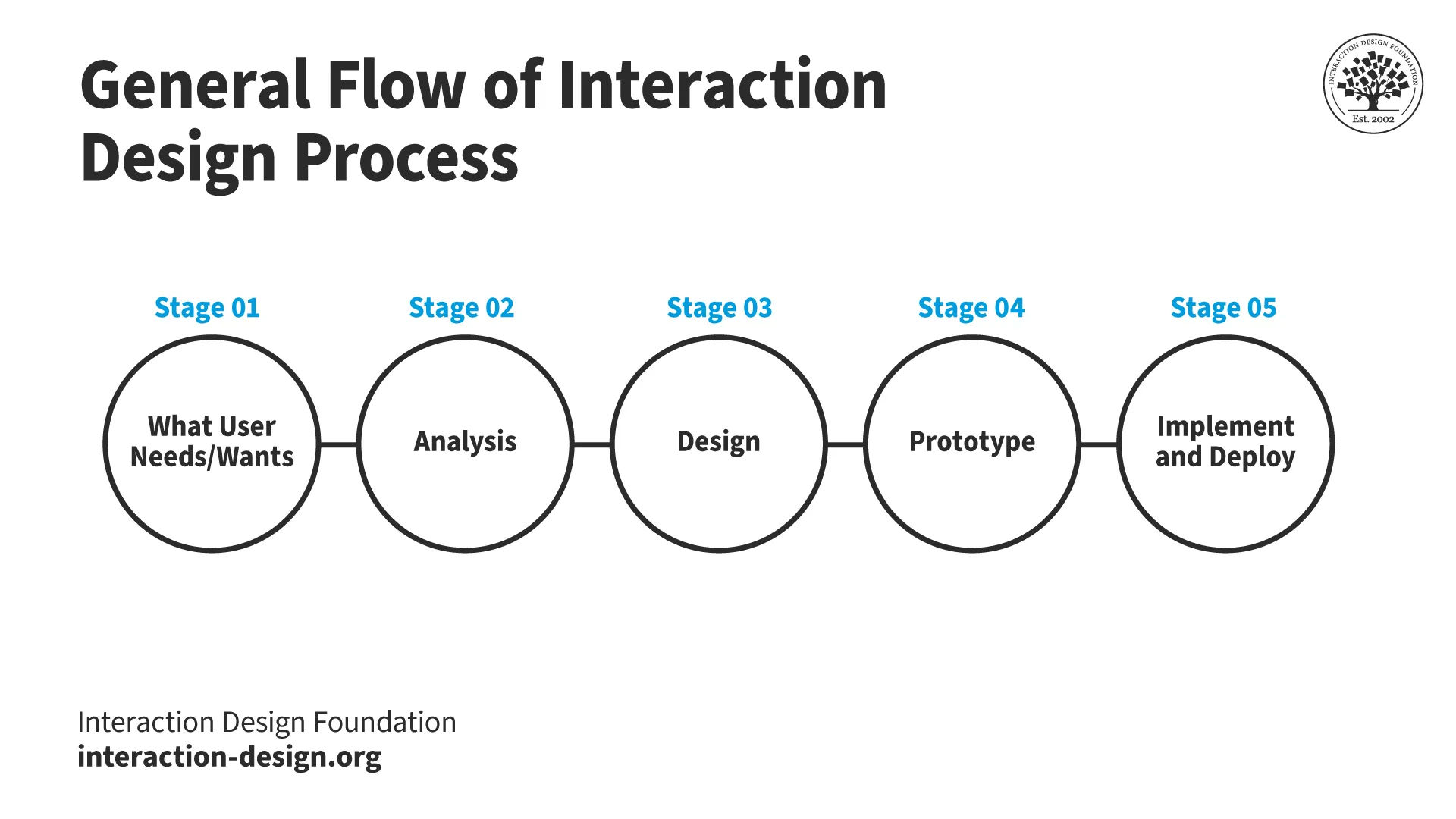
Flow of Design Iterations: Practical View
However, the more practical understanding of iterative design meaning involves adding Stage 0, which is a Business Trigger. For instance, this can be:
- New business goal (“increase retention by 20%”);
- Bug reports / technical debt (customer support might flag frequent issues, or the internal bug log can indicate the area to redesign/refactor);
- Analytics insights (high user drop-off points, rage clicks on heat maps, etc);
- Implementing new trends or ideas (a competitor might have added something, or a new trend dictates a new change);
- User or stakeholder requests (sometimes users request something to be changed or added, etc).
This business triggerl is then linked to user needs and wants, such as asking:
- What does a user need to retain longer?
- Why do 70% users from cohort A retain, while the majority of users from cohort B churn?
- Why do users drop off at X step?
- What do they need to overcome this drop-off point?
So, essentially, every business trigger translates into users’ needs and wants.
Moreover, once the business aim is set, it is only logical to measure it. Therefore, the iterative design meaning, in a more practical way, should come to an end with the evaluation stage. So, let’s iterate on the flow diagram by adding stages for business trigger and evaluation.

Iterative Design Meaning: The Stages Through the Lens of User Feedback
Stage 00 – Business Trigger
If it is a new product, the business trigger is about bringing the vision to life. At this stage, design iterations are often time-bound, such as weekly or bi-weekly. The aim of each sprint in this case is to produce a certain design deliverable. Yet, there are already assumptions about user needs and early insights. They usually come from early user interviews, market research, or trends.
For existing apps, the business triggers (dropping retention, underperforming feature, etc) are also a form of user feedback. After all, users vote with their attention, time, and money. So, if certain functionality underperforms, it indicates users expressing their unmet expectations, needs, or frustrations.
Stage 01 – What User Needs/Wants
This is where one explicitly links business triggers to user needs. While the previous stage already identifies what is happening (e.g. low engagement with a feature), at this stage of design iterations, the task is to interpret why this thing is happening. User feedback can take two major forms:
- Behavioural analysis through in-product analytics & cohort analysis;
- Direct user feedback through interviews, surveys, analysis of support tickets, or usability testing.
This enables translating ‘low engagement with feature X’ into, for instance, ‘users need to experience immediate value’. Overall, there are many reasons why certain user behavior might or might not happen:
- users may not see the value,
- experience confusion or frustration with finding things on the screen,
- not realize the actual use case,
- have too much friction with input or forms, etc.
At this design stage, user feedback helps clearly identify what the user needs to engage better, complete a purchase, and whatnot.
Stage 02 – Analysis
So, we’ve identified that low engagement comes from not seeing the immediate value, for example. In this stage, the team brainstorms and analyzes potential solutions for meeting user needs. For instance, for experiencing the immediate value, there can be the following solutions:
- Showing personalized content immediately;
- Improving in-app guidance towards a value-discovering moment;
- Simplifying the experience to reduce steps to the value-discovering action.
These solutions differ in potential effect as well as in cost and difficulty of implementation. During this stage, the team discusses these, makes a decision, and comes up with a specific measurable user requirement. For instance, add in-app guidance so that users can reach the core value within 2 clicks/interactions.
Stage 03 – Design
The diagram below shows the user-centered design process. This is a back-and-forth process. Designers think about the context: the device users are on, where they are in their user journey, their emotions, etc. They check back with requirements, and if need be, clarify those. They think about possible design solutions and make sure it meets the requirements. For instance, continuing the in-app guidance example, design solutions can be:
- A checklist for guiding users;
- Contextual tooltips.

The deliverables are often sketches, wireframes, or low- to mid-fidelity mockups. Depending on the budget and the company’s needs, either one or a set of strong solutions proceeds to the next stage.
Stage 04 – Prototype
Here, in lean MVP design iterations, it is usually the stage where the selected option is improved upon and clickable interactions are added. Before implementing and deploying the design change itself, it is possible to test it with users. This can either confirm that the change will meet user needs (value in 2 interactions) or pivot towards a better solution.
Stage 05 – Implement & Deploy
The feature that has passed the testing of its prototype is then implemented and deployed. This stage also involves regression testing to ensure it doesn’t break the existing functionality. Finally, the feature might be released to the entire audience or to a limited one for A/B testing first.
Stage 06 – Evaluate
As soon as a new design change hits the audience, it is time to track its impact.
- First user feedback is behavioral, which the team can get from tracking site analytics. They look into what is the feature usage, how the drop-off rates change, and the impact on conversion metrics.
- At the same time, direct user feedback also comes in through reviews, support tickets, or follow-up usability testing.
At Stage 00, the business sets out the success criteria as well as its measurable criteria at Stage 02 (Analysis). The design performance is compared against the goals to decide whether to continue working on this user need or switch to another business trigger. Additionally, users might enjoy the design change and suggest how else it can be improved, which can also trigger the next design iteration.
Understanding the Iterative Design Meaning: The Benefits
Building the Right Product for Users and Business
Close collaboration with users and a tight link with business outcomes on an iterative basis helps to steer the product toward its product-market fit (PMF). There have been times when teams would do ideation, user interviews, and brainstorming. Then, they would go into development mode for months without checking back with users. They would launch a year after with a product…that nobody needs. Being this detached from the users might well lead to a failure.
In contrast, the iterative design process implies frequent updates and touchpoints with two key stakeholders – users and business owners. The optimal iteration period is usually one or two weeks. This ensures that the business can reach its PMF faster, and users can enjoy exactly what they need the product to do.
Focus on real-world problems
Feedback loops of design iterations promote objectivity and prevent getting bogged down in the details and polishing. Designers themselves are creative professionals who immerse themselves in their work. Getting feedback from colleagues, stakeholders, and, most importantly, real users provides a much-needed check-in.
Eliminates waste
There are many examples of design ‘improvements’ that went wrong. It was often generally due to users rejecting the new feature/interface in the end. The more work your team does without validation from the users, the greater the risk of having to scrap the effort after all. Listening to users helps businesses to pivot early and steer the next design iteration in the right direction.
Build Client Relationship
In terms of users, being heard and seeing the change you voted for is valuable all on its own. Knowing the company values their feedback, seeks it out, and introduces change upon it does not go unnoticed. Many great products have been launched by forming tight-knit communities of early adopters. They would get to comment on every new change, and their feedback would go into the next design iteration. Then, these early adopters would evolve into product advocates and evangelists.
Enhancing Startup Investability
When it comes to outsourced teams and their clients, iterative design ensures that the client sees progress with regular intervals. Also, the founder, in their turn, updates stakeholders, including investors. This provides an opportunity to show the work in progress (WIP). In fact, for investors and VCs, especially pre-seed and seed, seeing WIP is proof of execution and ability to deliver, as well as greatly derisks the investment. This ultimately makes the startup more investable in the next round.
FAQ: Iterative Design Meaning: User Feedback in Design Iterations
Design iterations are typically short and frequent to allow faster learning and improvement. Many teams work in weekly or bi-weekly cycles to maintain momentum. Short cycles help quickly validate ideas and adjust direction when needed.
Prototyping allows testing design ideas before full implementation. It helps validate whether a solution meets user needs without investing significant development effort. This reduces risk and improves decision-making.
Iterative design reduces risk by testing ideas in small steps instead of making large changes at once. Early validation helps detect issues before they become costly. This approach prevents wasted effort and improves overall efficiency.
Design iterations connect user needs with measurable business outcomes such as retention and conversion. Each improvement is aligned with specific goals, making the design process more strategic. This ensures that design efforts contribute to growth.
An effective process includes clear goals, regular feedback loops, and measurable outcomes. It focuses on solving real user problems and adapts based on results. Continuous improvement is key to long-term success.